You're Drowning in Email. Here's a Way Out.
- Ashley Alexander
- Aug 18, 2025
- 5 min read

Updated: Aug 19, 2025
A founder I spoke with spends 20 hours a week working with an EA to manage his inbox. He forwards the important messages. The rest just sits. He pays $50 an hour for judgment and relationship care. Even with that help, he still misses signals that matter.
If that sounds familiar, this post is for you.
Key Takeaways:
Cut email triage time by 80 percent so your EA focuses on high-impact work, not admin.
Stay on top of relationship emails with smart labels that surface what matters
Keep your voice consistent with AI-drafted replies you can review and send
Maintain control with transparent actions, custom rules, and no auto-sending
Build trust gradually as the assistant learns from your edits and preferences
Why Founders Are Still Drowning in Email (And Why It Costs You)
Founders are bombarded with low-value messages every day. But the emails that matter most are personal, strategic, and easy to miss. Research shows knowledge workers spend a huge portion of their week in email. That time is expensive when it comes out of your own calendar or your EA’s.
Common Pain I Hear from Founders:
You forward only the important emails to your EA and hope nothing critical slips through.
You worry about control and tone. One bad reply can damage a relationship.
Your EA is smart and valuable but bogged down with triage and scheduling.
You delay adoption because the tools feel risky or complex.
What Is an Inbox-First Assistant?
An inbox-first assistant starts where the noise is highest and the stakes are real. It earns trust by showing value inside your actual workflow before asking for autonomy.
The right AI assistant does three things out of the gate:
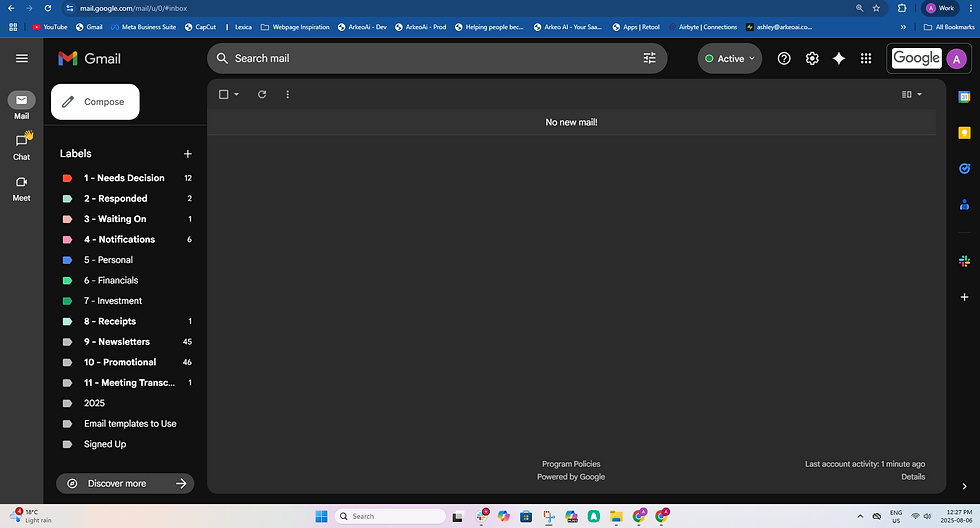
Auto-triages and labels incoming email. It classifies messages into buckets like urgent, follow-up, candidate, partner outreach, and noise.
Drafts replies in your voice. Each draft is written using your tone and past context. You approve, tweak, or send.
Provides a clean summary outside your inbox. A daily or twice-daily digest shows what matters, what was drafted, and what needs your attention.
Why This Works for Founders
It mirrors how your EA already works. You stay in control. You make the final call. You reduce review friction.
It learns your voice through approvals. Over time, you can hand off repeat messages with confidence.
It frees your EA to work on higher-leverage activities like relationship management and strategy.
Mini Case Study: The Recruiting Founder Scenario
Situation: A founder in recruiting works with an EA 20 hours a week. The EA charges $50 per hour and spends much of that time triaging the inbox. Important threads are forwarded manually.
Result with an inbox-first AI assistant:
Auto-labeled and drafted the routine 60 percent of emails the EA used to touch.
EA saved 1 hour per day on triage and redirected 3 hours per week toward candidate engagement and planning.
Estimated savings: $13,000 per year in time redirected from low-leverage tasks.
This assistant did not replace the EA. It made them more impactful. Admin turned into strategy.
How to Keep Control and Build Trust
Start with read-only triage. The assistant labels and drafts. It never sends.
Review drafts in batches. Approve or tweak. Teach the assistant your tone.
Set specific rules. Allow auto-replies only for clearly defined templates.
Keep an eye on key relationships manually. Flag VIPs and set escalation rules.
Add calendar later, once you trust the system.
Features Founders Should Expect
Inbox connection with secure, permission-based access.
Real-time auto-triage that creates priority labels.
Drafts written in your voice with a fast approval loop.
Chat-style prompts so you can teach the assistant using plain language.
AI Email Assistant for Founders: Inbox-First Triage
What Is Auto-Triage and Why It Matters
Auto-triage uses AI to label and rank incoming emails by importance. It reduces noise and surfaces high-value messages you might otherwise miss.
How Draft-in-Your-Voice Works
The assistant creates reply drafts that sound like you. It mimics your phrasing and tone based on past messages. You review and refine. Over time, it becomes indistinguishable.
Real Examples of Use Cases
Founder with EA: Shift routine candidate screening to auto-draft so the EA can focus on calls and negotiation.
Solo founder: Auto-prioritize investor emails and generate short, thoughtful replies.
Cross-functional exec: Batch-approve vendor messages and hand off scheduling tasks.
Frequently Asked Questions
What is an inbox-first AI assistant? An inbox-first assistant connects to your inbox and starts by organizing mail, drafting replies, and surfacing decisions you need to make.
How does it learn my voice? It learns from your approvals and edits. You can also provide writing samples or a style guide to speed up training.
How do I stay in control and protect my privacy? Start by reviewing the AI assistant’s privacy policy to understand what data is accessed, how it's stored, and whether it's ever used for training. Look for clear documentation on security practices and permissions.
What integrations should I expect? Start with labeling and drafts. Move into calendar and once your workflows and rules are clear.
What’s the best way to use this if I already have an EA? Loop your EA into the process. Let them co-create rules and use the assistant to reduce triage by 90 percent within 7 days.
Proof, Trust, and the Future of Delegation
Founders do not want black boxes. They want dependable systems that start small, prove value, and scale gradually.
Start with labels and drafts. Approve before sending. Let autonomy grow in clear steps.
One stat to remember: knowledge workers spend a massive portion of their week on email. That time multiplies when shared across you, your EA, and the rest of your team.
How to Get Started
Connect your Gmail account.
Lynda will triage your first 100 unread emails. She’ll label and sort them based on importance, respecting your existing labels.
She creates new labels and rules to help organize future emails.
Draft replies are generated for emails that need a response. You review and send.
Start your free trial now and experience what it feels like to get ahead of your inbox.
Conclusion
The founder I opened with kept control while finally offloading the noise. That is the point. An inbox-first AI assistant should protect your voice, surface what matters, and give your EA the freedom to do work that actually moves the needle.
If you want to see what this looks like in action, consider joining Lynda AI. Start with labels and drafts. Keep control. Scale trust at your own pace.

Comments