Inbox Noise Nearly Cost a Founder
- Ashley Alexander
- Aug 12, 2025
- 5 min read

A founder told us she spent two hours a day just on email. She tried multiple tools. Each one created more work than it saved. She almost stopped pitching investors because of a missed thread.
This is not rare. It is common. And it is solvable.
The Problem With Email for Founders
Email consumes far more attention than most founders realize. Many tools promise to help, but few truly reduce cognitive load.
A McKinsey Global Institute study found that knowledge workers spend nearly 28% of their workweek on email and collaboration, attention that can’t be reclaimed.
Key Outcomes of Solving the Problem
Cut daily email triage by up to 80% so you focus on decisions, not sorting.
Surface the 8 emails that actually need your attention every morning.
Get drafts that match your voice so you edit, not rewrite.
Keep sensitive data safe with enterprise-grade handling and non-training LLM policies.
Roll from inbox triage to a true AI executive assistant with calendar and agenda support.
Why Founders Hate Email (The Real Reasons)
From our research, here are the specific pain points founders described:
Hours spent on low-value tasks like filtering newsletters, scheduling, and triage, one founder reported roughly two hours per day.
Drafted replies often miss your tone, forcing rewrites.
Tools leave miscellaneous items in your inbox, creating friction and mistrust.
Sharing inbox access with teammates is risky when handling sensitive data.
Calendar prioritization features get priorities wrong, creating micro-management.
What Inbox-First AI Actually Solves
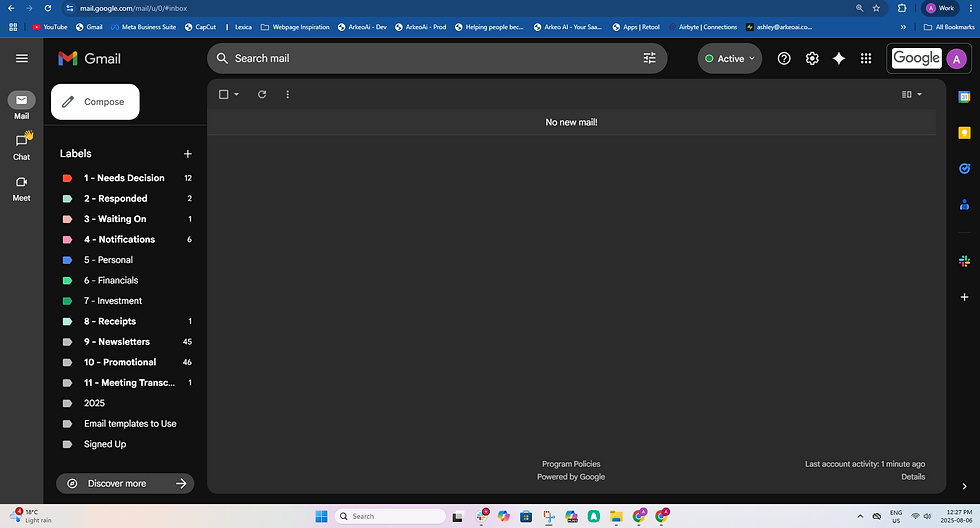
Stage 1 – Auto-Triage and Labeling in Gmail
Definition: Auto-triage means the system reads incoming email, classifies it, and moves it into labeled folders so your inbox shows only what needs a decision.
What it does today:
Scans every incoming email, writes a label, and moves non-action items to a folder.
Keeps anything needing your attention unread and creates a short agenda of decision items.
Produces draft replies you can use or discard with one click.
Why this matters:
You stop hunting through noise.
You reduce context switching and decision fatigue.
Stage 2 – Drafts in Your Voice With Human-in-the-Loop
Definition: AI drafts replies, but a human reviews before sending.
Near-term goal:
Achieve 70–90% accuracy in tone and content for most transactional and scheduling emails.
Configure the signature to appear as you or as an EA persona to reduce unnecessary inbound requests.
Stage 3 – Memory and Smarter Replies Using Vector Search
Definition: A vector database stores conversation embeddings so the assistant recalls context and past threads when drafting replies.
What that unlocks:
Replies that reference past conversations, agreements, or promises.
Fewer follow-up clarifications from recipients.
Mini Case Study – A Founder’s Inbox Transformation
Problem: A healthcare SaaS founder kept patient-sensitive links and partner threads in the same inbox. She wouldn’t share inbox access for privacy reasons, spending roughly two hours daily on triage.
Solution: We connected an inbox-first assistant to her email. The AI labeled emails, moved newsletters/promos out of view, and kept only 12 items in the morning action queue.
Results after two weeks:
Triage time dropped to 20 minutes per day.
Drafts were usable with light edits 70% of the time.
She trusted the AI assistant to surface critical vendor requests, freeing time for fundraising and product work.
Why Privacy Still Matters
Founders handling sensitive data asked the same question: how is my data used?
Here’s our short answer:
HTTPS and enterprise-grade sign-on protect data in transit.
Row-level security protects stored data.
APIs for LLM calls are configured so the vendor does not use your data to train public models.
Any future training on anonymized interaction data would be communicated and opt-in.
How to Evaluate Any Inbox-First Assistant
Before you connect an assistant to your inbox, ask these product and safety questions to ensure it actually fits how you work:
Does it respect your existing labels and folder rules? The best assistants don’t bulldoze your current system, they work with it, enhancing and refining instead of replacing.
Can it create custom labels for you automatically? This turns your unique workflow into a living system that organizes itself.
Does it triage emails in real time? Minutes matter. Hourly or twice-a-day batch processing leaves you reacting instead of staying ahead.
How is sensitive data protected? Look for row-level security and strict no-training policies for any AI models involved.
Can it surface only the emails that truly need your attention? The goal isn’t to read everything, it’s to read the right things, faster.
Quick Wins to Get Value Today
Connect one inbox and let the assistant run labeling for the first week. This gives you a baseline without changing your workflow overnight.
Track how much time you spend in your inbox now vs. before. Even a 20–30% drop is a big win.
Notice how it feels to open your inbox. Is it calmer? Clearer? That’s a signal you’re heading in the right direction.
Hold a 10-minute weekly check-in for the first two weeks to fine-tune rules and labels. Small adjustments early make a big difference later.
Pricing Reality and ROI
Every email may involve an LLM call, so costs scale with volume.
Even partial triage/draft coverage can justify a $50 monthly price for founders.
Early adopter programs often lock in lower rates in exchange for feedback.
How to Start With an Inbox-First Assistant Today
Connect a single inbox to start. Keep it focused so you can measure results clearly.
Let the AI assistant run full triage and draft generation from day one. This gives you an immediate look at how it handles your real workload.
Track the change in time spent on email. Even small daily savings compound fast.
Pay attention to how it feels to open your inbox. Is it clearer? Are the right things at the top?
Review and edit a few drafts each day. This feedback trains the system to match your voice faster.
Refine labels and rules weekly. Small adjustments early lead to a smoother, more reliable system.
FAQ
What is Auto-Triage?
Automated sorting — reads, labels, and moves low-value items out of your focused inbox.
Will the AI Train on My Private Data?
No, your data is never used to train public models. We use APIs with strict no-training policies and protect every record with row-level security, so only authorized access is possible. Your emails are processed in real time to generate labels and drafts, but never stored or shared beyond what’s required to deliver the service.
Can the Assistant Write in My Voice?
Yes, but early drafts may need edits. Feedback improves tone accuracy.
Can It Act as an EA Persona?
Yes, set signature/sender conventions to filter access.
How Quickly Do Results Show?
Labeling improvements can appear in days; draft quality usually take weeks of tuning.
Conclusion and Next Step
Email is not just a time problem, it’s an attention problem. Fixing triage is the low-friction, high-impact first step.
If you’re a founder spending two hours daily on email, start with triage, test drafts, and tune weekly. If it saves you an hour a day, that’s time back for product, customers, and fundraising.


Comments